I’m a big fan of the Zed editor. It’s been my daily driver (when I’ve had a choice) for around a year now. It runs like butter on an ancient nine-year-old Dell XPS that’s been my Arch Linux hobby machine for a while. Back when I was a Windows guy coding in Visual Studio, one of my favourite tools was TestDriven.NET, an open source test runner by Jamie Cansdale. A superpower of TestDriven.NET was its ability to run unit tests, or any function, under the cursor. It was a simple but immensely powerful tool. I was musing that something similar for Zed would be a fantastic addition. There didn’t appear to be an extension that did what I wanted, and I even considered getting Claude to attempt to write such an extension in Rust, but while prompting Claude for how it could work, it suggested an alternative path, Zed Tasks.
Tasks let you define and run terminal commands directly from within the editor,
keeping your workflow focused without switching context. You configure them (see
the Tasks documentation) in
~/.config/zed/tasks.json (globally) or .zed/tasks.json (per project), and
invoke them via the task picker (task: spawn, or just ctrl-t). What makes
tasks particularly powerful is their access to editor state through built-in
variables — $ZED_FILE gives you the current file path, $ZED_SYMBOL the
symbol under the cursor, and $ZED_SELECTED_TEXT any highlighted text — making
it straightforward to do things like run only the test your cursor is sitting
on.
Here’s a screenshot of my individual test runner in action. Just put the cursor
on the test, hit ctrl-t, and select “run test at cursor”. After the first
selection it’s just ctrl-t <ENTER> each time. Super efficient and very much
like my old TestDriven.NET experience.
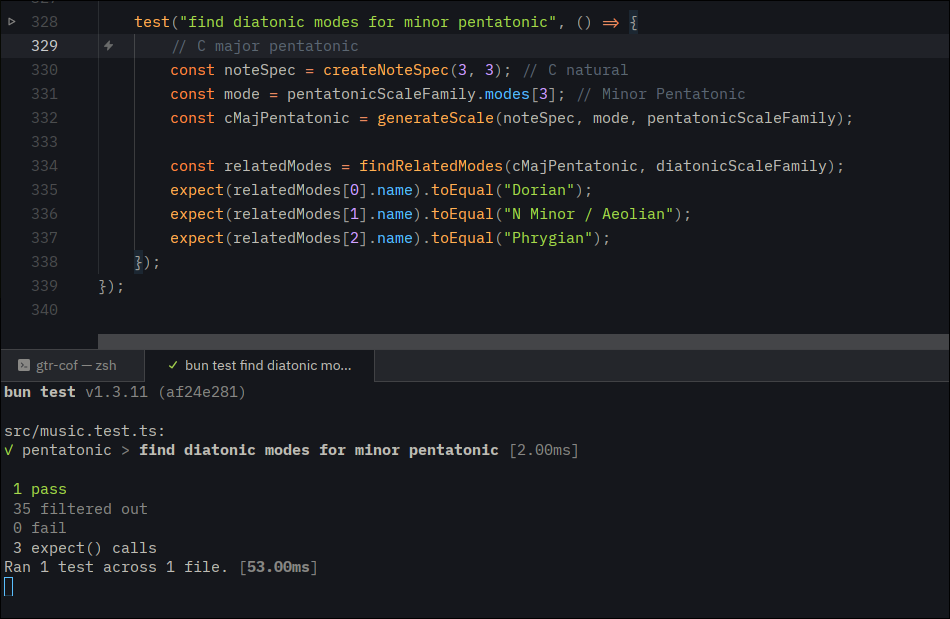
Here’s the test runner task. Copy it into ~/.config/zed/tasks.json.
[
  {
    "label": "Bun: run test at cursor",
    "command": "bun test $ZED_FILE --test-name-pattern \"$ZED_SYMBOL\"",
    "use_new_terminal": false,
    "save": "current"
  },
  {
    "label": "Bun: run tests in file",
    "command": "bun test $ZED_FILE",
    "use_new_terminal": false,
    "save": "current"
  }
]